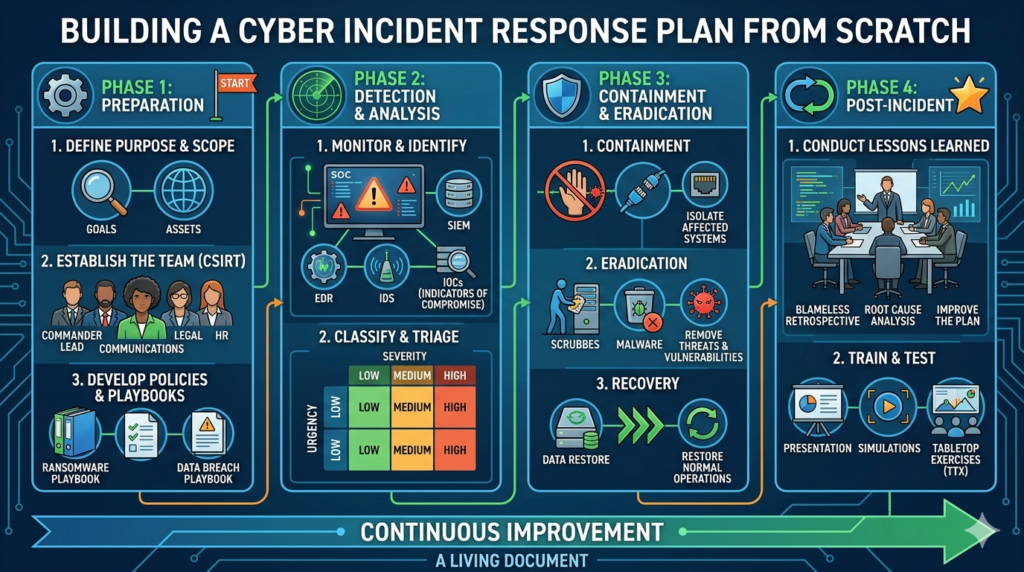


Silent breaches are the scariest. Are these warning signs already present in your network? Read this before your next Monday morning.
The Intruder Is Already Inside. You Just Don’t Know It Yet.
Here’s the most unsettling truth in cybersecurity today: the biggest threat to your business is not a hacker who’s trying to get in. It’s a hacker who’s already in, and has been there for weeks.
The average dwell time of a network intrusion lasts an average of 197 days before discovery. Nearly seven months. While you’re onboarding new clients, closing deals, and running payroll, an attacker could be quietly mapping your systems, reading your emails, stealing your files, and preparing to either sell your data or lock you out entirely.
IBM’s Cost of a Data Breach 2025 study notes the average breach lifecycle sits at 241 days, around 181 days to identify and 60 days to contain. That means from the moment an attacker gets in to the moment the damage is contained, your business is bleeding for over eight months, often without knowing it.
This is what cybersecurity professionals call a silent breach. No obvious ransom note. Just a ghost moving carefully through your systems, learning everything they need to know before they strike.
Findings from the Identity Theft Resource Center’s 2025 Data Breach Report reveal that 2025 saw the highest number of breaches to date, yet the amount of victim notices decreased by 79% year-over-year. This suggests malicious actors are moving away from mega-breaches in favour of frequent, precise attacks on valuable data sources.
In other words, attackers are silent now. More patient. More targeted. And more dangerous.
The good news? They almost always leave traces. Indicators of compromise (IoC) are forensic artifacts found on a network or operating system that indicate a potential intrusion or breach. These data points, malicious IP addresses, unusual outbound network traffic, suspicious file hashes, and anomalous login attempts, help cybersecurity professionals identify, detect, and respond to security incidents.
The question is: do you know what to look for?
Here are the 10 warning signs that your network may already be compromised, and what to do the moment you spot them.
Sign 1: Unexplained Slowdowns and Unusual Network Traffic
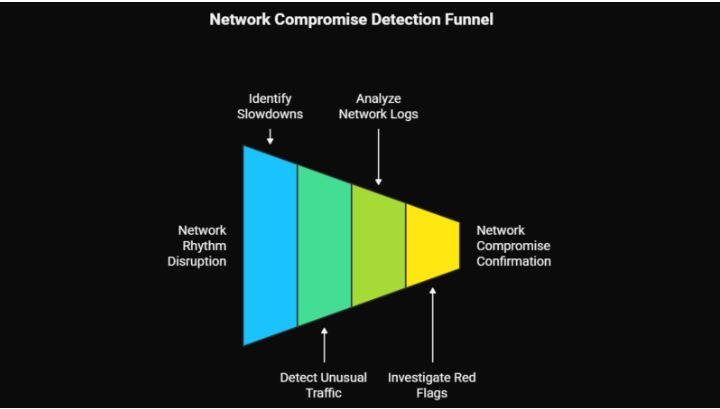
Your network has a rhythm. On a normal day, it moves at a predictable speed, handling the usual volume of email, file transfers, video calls, and application traffic. When something breaks that rhythm without a clear reason, it deserves attention.
Your network ordinarily operates at a consistent speed. If you suddenly experience prolonged slowdowns, this can be a telltale sign of a compromised network. Possible causes include unusual network traffic, an influx of data sent to and from your network, and resource hijacking, where malware or unauthorised users consume bandwidth for malicious activities.
What’s actually happening: If an attacker is inside your network, they’re likely doing one of several things that consume bandwidth, scanning your internal systems to map them, communicating with external command-and-control servers, or actively exfiltrating data. All of these activities generate traffic. And all of them slow things down.
One common IOC is the detection of anomalous outbound or inbound traffic. This may include sudden spikes in data transfers, connections to suspicious or unrecognised IP addresses, and mismatches between network ports and the expected application traffic.
What to do: Pull your network logs and look for traffic to unfamiliar IP addresses, unusual data volumes during off-hours, or connections to foreign geographies your business doesn’t operate in. A spike in outbound data at 2am from a workstation that’s typically idle is a serious red flag.
Sign 2: Login Activity From Strange Locations or Odd Hours
Your team in Mumbai doesn’t log in from Lagos at 3am. Your accounts team doesn’t access the finance system at midnight on a Sunday. When login patterns break from the expected, that anomaly matters.
An increase in failed log-in attempts, access requests from unfamiliar geographic areas, or unexpected behaviour from administrator accounts can signal potential intrusions.
This is one of the most common early indicators of a compromised credential. Attackers who have obtained a username and password through phishing, a dark web purchase, or a previous breach will often begin testing access from their own location, which may be halfway around the world from your actual team. Stolen credentials were the second most common initial attack vector according to Mandiant M-Trends investigations, occurring in 16% of cases.
Also watch for: Successful logins immediately followed by failed attempts on other systems (privilege escalation), multiple simultaneous sessions from the same account, logins from device types not typically used by a given employee (e.g., a developer’s account logging in from a mobile device), and accounts that were recently created or not used in months suddenly becoming active.
In one major 2025 breach, unauthorised access persisted for nearly 5 months after a former employee retained authentication keys after leaving, enabling insider credential abuse that went undetected until unusual activity was flagged.
What to do: Enable geo-location login alerts, audit your identity and access management (IAM) system for dormant accounts, and review which accounts have access to your most sensitive data.
Sign 3: Disabled or Tampered Security Software
This is one of the most alarming signs on this list, and one of the most frequently overlooked. One of the most immediate signs of a network breach is manipulation of your security software.
Sophisticated attackers know that your antivirus, endpoint detection, and firewall tools are their biggest obstacles. Before deploying ransomware, exfiltrating data, or creating persistent backdoors, many attacker playbooks specifically call for disabling or tamper-proofing these tools. If your antivirus has stopped updating, your firewall rules have changed without a change request, or your endpoint detection tool is showing as inactive on specific devices, those are not coincidences.
CrowdStrike reported that 75% of intrusions in 2025 were malware-free, leaning heavily on credential abuse, social engineering, and session hijacking. That means modern attackers are increasingly operating using legitimate tools and processes, making it harder to detect them, but also making it all the more critical that your security monitoring tools remain active and unmodified.
What to do: Implement centralised monitoring for the health status of all security tools. Set alerts for any configuration changes to firewalls, endpoint agents, or log forwarding. Any modification to a security tool should require an authorised change ticket.
Sign 4: Files That Have Been Modified, Moved, or Disappeared

Your files don’t move themselves. They don’t change size without a reason. And they certainly don’t delete themselves.
Changes in file size you can’t account for are a glaring sign of unauthorised manipulation. If files or programmes have a recent “last modified” date that doesn’t align with your updating records, this could indicate that an external party has accessed and possibly altered them. If files are found in unexpected locations, or if unfamiliar files or programmes appear that you did not install, your system may have been breached.
What attackers are doing when they move or modify files: Staging data for exfiltration (grouping sensitive files in one location before transferring them out), planting malware or backdoor files disguised as legitimate system files, altering log files to cover their tracks, or modifying configuration files to create persistent access.
The appearance of new, unexplained executables is particularly important. Many ransomware attacks are preceded by days or weeks of reconnaissance during which the attackers plant tools across the network. You may see these as unfamiliar processes running in the background.
Process anomalies, such as unfamiliar processes running in the background, such as cryptocurrency miners or keyloggers, are key host-based indicators of compromise.
What to do: Implement file integrity monitoring (FIM) on critical directories and system files. Any unexpected change triggers an alert. Conduct periodic audits of recently modified files, especially in system directories and network shares.
Sign 5: Unexpected Password Reset Notifications
If your inbox contains a password reset email you didn’t request, for any account, on any platform, treat it as a potential intrusion event until proven otherwise.
If you receive notifications for password resets that you didn’t request, this could mean someone is trying to gain access by resetting your credentials. Should you receive an unexpected password reset notification, immediately verify its authenticity and change your passwords using a known safe method.
The mechanics are simple: an attacker who has obtained your email address (freely available in millions of breached databases) will attempt password resets on accounts they believe you hold. If your email is already compromised, they may intercept those reset links entirely, gaining access without you ever seeing the notification.
This sign becomes especially dangerous if the targeted account is a privileged one: an admin account, a cloud management console, a payroll system, or an email account with access to sensitive communications. 60% of breaches involve a human element like phishing or stolen credentials, according to Verizon’s 2025 DBIR.
What to do: Configure alerts for all password resets across enterprise accounts. Enrol all accounts in MFA immediately. Conduct regular dark web monitoring to check whether any of your employee credentials are circulating in breach databases.
Sign 6: Unusual DNS Queries and Outbound Connections
Most users in a business never need to think about DNS. But for a security-aware IT team, DNS traffic is one of the richest sources of threat intelligence available, and one of the clearest windows into whether something malicious is operating on your network.
DNS query anomalies, such as repeated requests to domains linked to phishing campaigns or malware distribution, are strong network-based indicators of compromise. Suspicious IP addresses with connections to command-and-control (C2) servers, and unusual port activity where attackers use unusual ports to bypass security measures, are also key warning signs.
Malware frequently communicates “home”, reaching out to attacker-controlled infrastructure for instructions, software updates, or to transmit stolen data. This communication almost always leaves DNS traces. Repeated lookups for domains that are newly registered, hosted in unusual jurisdictions, or that follow suspicious naming patterns (randomly generated strings are common) indicate that something on your network is trying to phone home.
A technique called DNS tunnelling is particularly dangerous and increasingly common, attackers encode data inside DNS queries to exfiltrate information in a way that bypasses many traditional security controls.
What to do: Enable DNS logging and review it regularly for unusual query patterns. Blacklist DNS resolution for known malicious domains using threat intelligence feeds. Implement DNS filtering at the network level. Alert on DNS queries to newly registered domains or domains with high entropy in their names.
Sign 7: Abnormal Behaviour from Admin Accounts
Administrator accounts are the master keys of your network. If they’re behaving strangely, or if new admin accounts have appeared that nobody created intentionally, treat that as a five-alarm emergency.
Unexpected behaviour from administrator accounts, unexpected privilege escalation requests, or unauthorised changes to system settings are early warning signs that attackers are attempting to gain a foothold within the network.
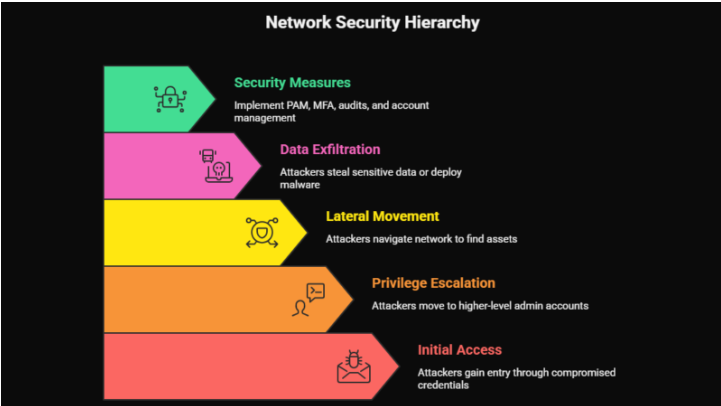
One of the primary goals of most attacker playbooks after initial access is privilege escalation, moving from a lower-privileged account (perhaps a compromised employee credential) to a higher-privileged account with broader access. Once they have admin rights, they can create new backdoor accounts, modify security policies, access all sensitive data, and eventually deploy ransomware across the entire environment.
After gaining access to the network, attackers navigate throughout the network’s east-west corridor to locate, identify, and exfiltrate high-value assets or deploy malware for widespread damage. This lateral movement allows them to escalate privileges, map the network’s internal topology, and compromise additional user accounts and systems, often remaining undetected.
What to do: Implement privileged access management (PAM). Enforce multi-factor authentication on all admin accounts without exception. Alert immediately on any new account creation, especially accounts with elevated privileges. Conduct a quarterly audit of all admin accounts and remove unsafe accounts.
Sign 8: Devices Restarting or Crashing Without Explanation
People ignore random reboots as hardware quirks or software bugs. Sometimes they are. But in the context of a potentially breached network, they deserve a second look.
Pay close attention to frequency, devices restarting more often than usual without scheduled updates, and context, reboots occurring without user initiation or identifiable reason.
Malware frequently causes instability in the systems it infects. Rootkits that embed themselves in system processes can trigger crashes when those processes are interrupted. Cryptomining malware, which hijacks your device’s processing power to mine cryptocurrency for attackers, can cause overheating and instability. And certain types of ransomware perform test encryptions before full deployment, which can manifest as unexpected freezes or reboots.
In late 2025, a new attack technique called “EDR-Freeze” emerged, capable of suspending endpoint detection and response tools, sometimes causing the endpoint itself to become unstable or require a restart in the process.
What to do: Centralise your endpoint logs and set alerts for crash events. Any device that restarts unexpectedly should be investigated at the process level before users are permitted to continue working on it. Check running processes and startup items for anything unfamiliar.
Sign 9: Unexpected Data Leaving Your Network (Exfiltration)
If your network is experiencing a breach, at some point the attacker is going to take something out. That act of removal, data exfiltration, is one of the most detectable moments of an entire intrusion, if you’re watching.
If you observe data being exported to unfamiliar locations, this may signify that data is being stolen. Unauthorised data exports in network logs are a key indicator of a breach.
Modern attacks have made exfiltration both more common and more damaging. In 2025, 87% of ransomware attacks involved data exfiltration before encryption, meaning attackers take a copy of your data before they lock it, giving them leverage even against organisations with solid backups. The data gets sold on dark web forums, published publicly, or used for targeted follow-on attacks.
Early IoC detection helps prevent large-scale data exfiltration by identifying suspicious network activity before attackers can steal sensitive information or intellectual property. Proactive monitoring minimises the impact of security breaches by enabling early detection and rapid response to threats.
Signs of active exfiltration: Large volumes of data moving to external IP addresses outside business hours, uploads to file-sharing services or cloud storage that your organisation doesn’t use, compressed archive files (.zip, .rar, .7z) being created in unusual directories before being transferred, and traffic patterns that don’t match any scheduled backup or synchronisation jobs.
What to do: Implement a data loss prevention (DLP) solution. Set volume-based alerts for outbound data transfers. Review firewall logs for large outbound connections. Cloud Access Security Broker (CASB) tools can provide visibility into unauthorised cloud uploads.
Sign 10: Your Security Team Finds Out From Someone Else

This one cuts deep. But it’s more common than most organisations want to admit.
Approximately 11 data breaches come to everyone’s notice. Many breaches go unreported for months. Ransomware victims often appear on threat actor leak sites significantly before official company disclosures.
In many breaches, the affected organisation is the last to know. They find out when a threat researcher contacts them about their data on a dark web forum, when a client calls to say their data is selling online, when a journalist asks for comment on a reported breach, when law enforcement knocks on the door, or when regulators notify them of a compliance violation.
In Q4 2024, 57% of ransomware incidents were first detected by external parties rather than the organisations themselves. More than half. External parties, customers, researchers, law enforcement, even the attackers themselves, knew about the breach before the victim organisation did.
This isn’t just embarrassing. In India under the DPDPA, in Australia under the Notifiable Data Breaches scheme, and across all industries in the US under various state and federal breach notification laws, failing to detect and disclose a breach promptly carries significant regulatory and legal consequences.
What to do: Implement 24/7 security monitoring, or partner with a Managed Detection and Response (MDR) provider. Subscribe to dark web monitoring services that alert you when your data or credentials appear in breach databases. Conduct regular penetration tests and threat-hunting exercises to actively seek out signs of compromise before an attacker can do real damage.
The Hidden Cost of Late Detection
Every day that a breach goes undetected, the cost grows. Studies show that breaches detected within 200 days cost $1.12 million less than those taking longer to identify. Reduced dwell time directly correlates with lower incident response costs and business impact.
That $1.12 million gap is purely a function of time. The faster detection helps to lessen the damage. The less data is stolen. The less systems are compromised. The fewer regulatory fines accumulate. The less reputational damage compounds.
Thanks to the wider adoption of detection and response technology, the global median dwell time dropped to 10 days in 2023, down from 16 days in 2022. But without keeping a close eye on IoCs, organisations of all sizes are leaving the door wide open.
What Attackers Are Counting On
Attackers are not operating randomly. They are strategic, patient, and increasingly automated. Here’s what they’re counting on from your organisation:
- That you won’t check your logs. Most small and medium businesses don’t have 24/7 monitoring. Logs pile up unreviewed. Anomalies go unnoticed for months.
- That you’ll assume slowdowns are IT problems. Unusual network performance gets attributed to ISP issues or aging hardware. Nobody digs deeper.
- That your off-boarding process is incomplete. As seen in multiple 2025 breaches, former employees with retained credentials remain active access points long after they’ve left. In one case, unauthorised access persisted for nearly five months after a former employee retained authentication keys.
- That your backups aren’t tested. Attackers specifically target backups as part of their pre-ransomware playbook. If you attach your backup system to the main network and fail to test it, you leave yourself with no recovery option when attackers encrypt everything.
- That you’ll pay before you investigate. Once the ransom note appears, the psychological pressure to pay quickly is intense. Attackers count on panic overriding forensic investigation.
Your Immediate Action Checklist
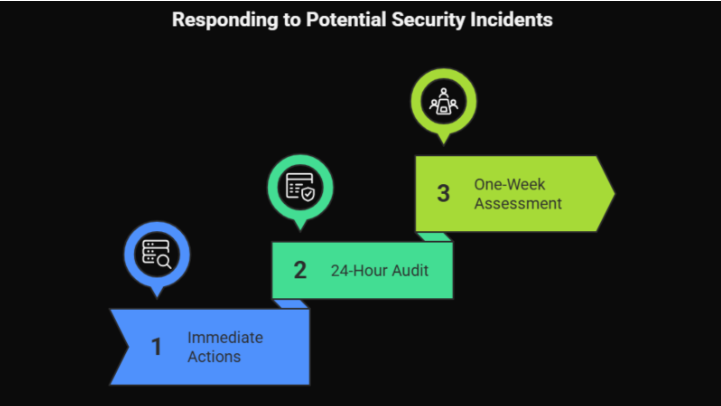
If any of the 10 signs above ring a bell, even slightly, treat it as a potential active incident and take these steps now:
- Within the next hour: Pull network logs and review outbound traffic for the last 7 days. Check for any new user accounts, especially admin-level ones. Verify that all security tools are active and unmodified. Look for recently modified system files in unexpected locations.
- Within 24 hours: Audit all accounts fully and remove any that are not safe. Check all employee credentials against known dark web breach databases. Verify that all backup systems are safe from the main network and that the latest backup is intact and restorable.
- Within one week: Engage a professional for a formal network security assessment or penetration test. Implement or review your incident response plan. Brief your team on phishing awareness and social engineering warning signs.
The Bottom Line: Visibility Is Everything
According to the 2025 ExtraHop Global Threat Landscape Report, visibility is the top challenge hindering organisations’ ability to respond to security threats in a timely manner. When lacking complete visibility into the network, organisations are missing the opportunity to detect attackers’ most dangerous weapon, lateral movement.
Silent breaches are only silent because the victim isn’t listening.
Every tool, every log, every anomaly, every device restart is a potential signal. The organisations that detect breaches early and contain them quickly are not the ones with the most expensive security infrastructure, they’re the ones with the best visibility and the discipline to act on what they see.
The 10 signs in this blog are your listening guide. They are the whispers that precede the shout. Don’t wait for the ransom note.
Start looking now.
Not sure if these signs are present in your network right now? You’re not alone, and you shouldn’t have to guess. Book your network scan today. Our security team will map your attack surface, identify active vulnerabilities, check for indicators of compromise, and give you a clear, jargon-free report on where you stand, before an attacker finds it first.